Download Counter-Strike 1.6 for free - full Non-Steam version (v44), as an EXE installer, portable ZIP or RAR. Works on Windows XP to 11, on PC and laptop. No account needed, just install and play.
Download CS 1.6 - 156 MBNo signup. No launcher. Just the game.
Check the file yourself - VirusTotal scan
Download CS 1.6 and launch it right away. This full version is a Non-Steam build that comes with a working server browser and bots, and needs no Steam account. Install it, open the game, and play online, on LAN, or offline against bots.
CS 1.6 EXE installer, portable ZIP or RAR - which one to download
CS 1.6 EXE installer (156 MB): the simplest CS 1.6 download. Run the setup file cstrike2025.exe, choose a folder and the installer copies the game files to your PC or laptop.
CS 1.6 portable ZIP (205 MB): a CS 1.6 portable download with no traditional installation. Open the ZIP, choose "Extract All" (or use 7-Zip / WinRAR), then start the game from the extracted folder.
CS 1.6 RAR (185 MB): the same portable idea in a RAR archive, for people who prefer WinRAR, 7-Zip or another compatible archive program.
The free download links are in the box at the top of this page.
Counter-Strike 1.6 download for PC and laptop - Windows XP, 7, 10 and 11
This CS 1.6 download is made for desktop PCs and laptops running Windows XP to Windows 11. Choose the EXE installer for a standard setup, or the ZIP or RAR version if you prefer to extract and run. No Steam required.
CS 1.6 is a 32-bit game from 2000, so it runs on both 32-bit and 64-bit Windows. Whether you are on an older Windows 7 laptop or a new Windows 11 PC, the process is the same: download, install and play. The game is light, so it also runs well on modest hardware.
If Windows shows a compatibility warning on Windows 10 or 11, right-click cstrike.exe and try Compatibility mode (see the system requirements below). The whole download and install usually takes about 3 minutes.
How to download and install Counter-Strike 1.6 (EXE installer)
cstrike2025.exe (156 MB). If Chrome or Edge warns about the .exe file, check the VirusTotal scan above, then click "Keep".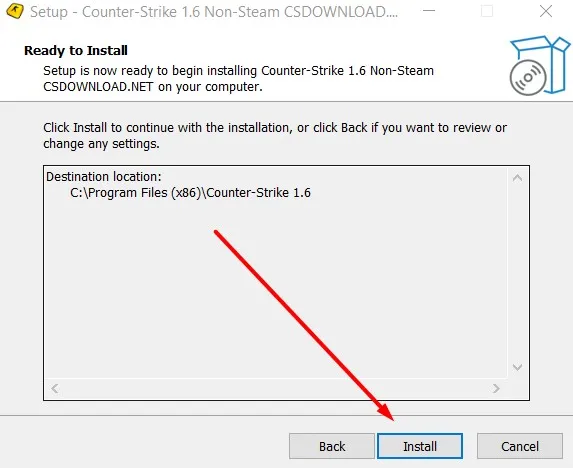
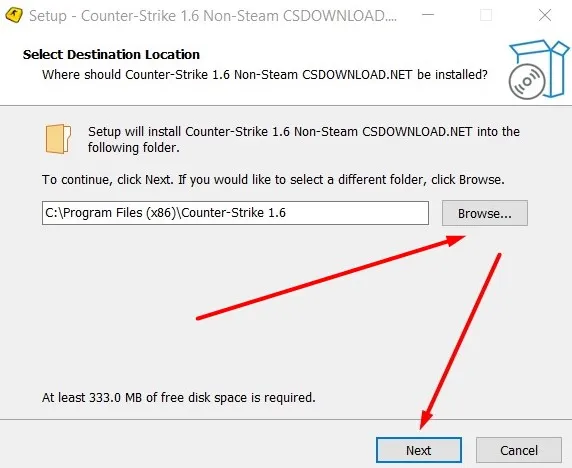
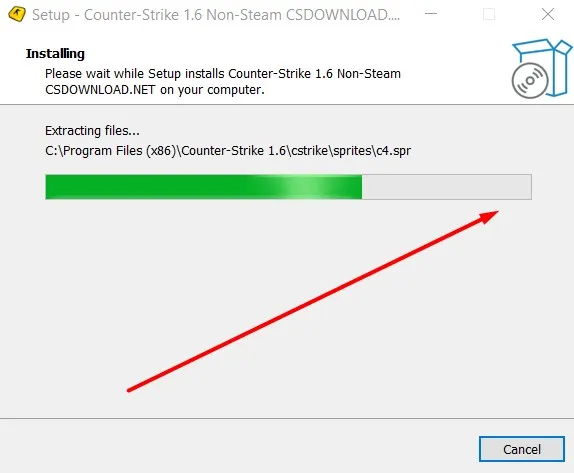
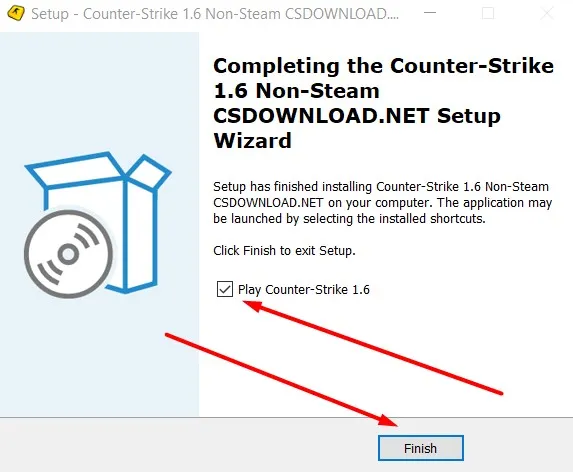
cstrike.exe from your installation folder. No Steam login required - start playing immediately.How to install CS 1.6 from the portable ZIP or RAR (no installer)
Use these steps if you downloaded the CS 1.6 ZIP (205 MB) or RAR (185 MB) instead of the EXE installer.
Install CS 1.6 from ZIP
- Click the CS 1.6 ZIP download link under the green button at the top of this page.
- Wait for the download to finish, then open the ZIP file.
- Choose "Extract All", or extract it with 7-Zip or WinRAR, into a folder of your choice.
- Open the extracted folder.
- Run
cstrike.exeorCounter-Strike.batto start CS 1.6.
Install CS 1.6 from RAR
- Click the CS 1.6 RAR download link under the green button at the top of this page.
- Open the RAR archive with WinRAR or 7-Zip.
- Choose "Extract Here", or extract it into a folder of your choice.
- Open the extracted folder.
- Run
cstrike.exeorCounter-Strike.batto start CS 1.6.
The portable versions need no traditional installation. After extracting, you can keep the game folder wherever you like.
Non-Steam Counter-Strike 1.6 vs Steam
A Non-Steam version means you do not need the Steam client, a Steam account or a purchase to start the game. Install it, run cstrike.exe and play. This page offers only the Non-Steam build. The official Counter-Strike distribution is available from Valve through Steam; this page is not affiliated with Valve.
- No Steam account: install or extract the game and launch it directly.
- Online: join servers from the in-game server browser. With P47 and P48 you can play on Steam and Non-Steam servers, if the server owner allows Non-Steam players.
- LAN and offline: play over a local network or against bots.
How to play CS 1.6 after the download: online and LAN
Play CS 1.6 online
- Open CS 1.6.
- Click
Find Serversin the main menu. - Select the Internet tab.
- Wait for the server list to load.
- Choose a server and join. The ping column helps you pick a fast one.
Play CS 1.6 on LAN
- Open
Find Serversand select the LAN tab to join a game on your local network. - To host a game for friends, click
Create Serverand start it.
Some servers are Steam-only and do not accept Non-Steam players; the server owner decides.
Play Counter-Strike 1.6 offline with bots
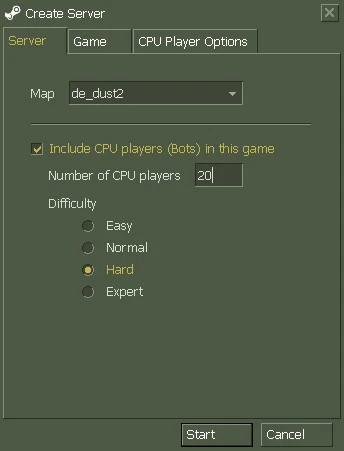
Bots are included in this CS 1.6 download, so you can play offline without joining an online server, and you do not need to install anything extra. Follow these steps:
- Open the game and click
New Game. - In the
Create Serverwindow, choose a map or leaveRandom Map. - Check
Include CPU players (Bots) in this game. - Choose the number of CPU players.
- Select the difficulty: Easy, Normal, Hard or Expert.
- Click
Start.
During a game, CS 1.6 bots can also be added or removed through the console:
bot_add_ct adds a bot to the Counter-Terrorist team. bot_add_t adds a bot to the Terrorist team. bot_difficulty 2 sets bot difficulty to 2 (Hard). bot_kick removes all bots.
Need more for CS 1.6? Visit our partner site:
Counter-Strike 1.6 Resources & FilesMaps, configs, fixes and game updates for CS 1.6 are available there.
Classic Counter-Strike 1.6 - the old version, not a modern Counter-Strike
Counter-Strike 1.6 is the classic, older release of the game, known for its simple graphics, classic maps and very low system requirements. This page offers that CS 1.6 client rather than a newer Counter-Strike game. There is no newer CS 1.6 version to look for. The "new" and "old" CS 1.6 are the same classic game. This is the original CS 1.6 gameplay: on most servers you play the same classic game as Steam players, with only small differences, such as some video settings or the avatars shown on the scoreboard.
Players write the name in many ways: CS 1.6, CS1.6, CS 16 and Counter-Strike 1.6 all mean the same game. If you were searching for a Counter Strike download for PC under any of those spellings, this is the right page.
What's included in this CS 1.6 download
Counter-Strike 1.6 system requirements
CS 1.6 runs on most PCs and laptops made after 2000. If Windows shows a compatibility warning, right-click cstrike.exe → Properties → Compatibility → run in compatibility mode for Windows XP (Service Pack 3).
Is this Counter-Strike 1.6 download safe?
Windows may also show a "Windows protected your PC" SmartScreen message for an installer that is unsigned or has little reputation yet. That message alone does not mean the file contains a virus. If the scan looks fine and you trust the source, click "More info", then "Run anyway".
Frequently asked questions about Counter-Strike 1.6
Is Counter-Strike 1.6 free to download?
Do I need Steam to run CS 1.6?
How to download Counter-Strike 1.6?
Should I download the EXE, ZIP or RAR version of CS 1.6?
Does CS 1.6 work on Windows 10 and 11?
cstrike.exe.Is the CS 1.6 download safe?
Does CS 1.6 run on 32-bit and 64-bit Windows?
Can I download CS 1.6 for Windows XP or Windows 7?
What is the difference between Non-Steam CS 1.6 and the Steam version?
cstrike.exe directly.